Nav2 Logo
latest
  • Getting Started
    • Installation
    • Running the Example
    • Navigating
  • Development Guides
    • Build and Install
      • Install
        • For Iron and Older
        • For Jazzy and Newer
      • Build
        • Released Distribution Binaries
        • Rolling Development Source
        • Docker Container Images
        • Using Pre-built nav2_docker Images
      • Generate Doxygen
      • Help
        • Build Troubleshooting Guide
    • Dev Containers
      • Dev Container Guide
        • Creating Dev Containers
        • Using Dev Containers
      • What, Why, How?
        • What is a Dev Container?
        • Why use a Dev Container?
        • How do Dev Containers work?
      • Prerequisites
      • Getting started
      • Security
    • Getting Involved
      • Getting Involved
      • Process
      • Licensing
      • Developer Certification of Origin (DCO)
  • Navigation Concepts
    • ROS 2
      • Action Server
      • Lifecycle Nodes and Bond
    • Behavior Trees
    • Navigation Servers
      • Planner, Controller, Smoother, Route, and Behavior Servers
      • Planners
      • Controllers
      • Behaviors
      • Smoothers
      • Route
      • Robot Footprints
      • Waypoint Following
    • State Estimation
      • Standards
      • Global Positioning: Localization and SLAM
      • Odometry
    • Environmental Representation
      • Costmaps and Layers
      • Costmap Filters
      • Other Forms
    • Nav2 Academic Overview
  • First-Time Robot Setup Guide
    • Setup Guide for Gazebo
      • Setting Up Transformations
        • Transforms Introduction
        • Static Transform Publisher Demo
        • Transforms in Navigation2
        • Conclusion
      • Setting Up The URDF
        • URDF and the Robot State Publisher
        • Setting Up the Environment
        • Writing the URDF
        • Build and Launch
        • Visualization using RVIZ
        • Adding Physical Properties
        • Conclusion
      • Setting Up The SDF - Gazebo
        • About SDF
        • Writing the SDF
        • Build and Launch
        • Conclusion
      • Setting Up Odometry - Gazebo
        • Odometry Introduction
        • Setting Up Odometry on your Robot
        • Simulating an Odometry System using Gazebo
        • Conclusion
      • Smoothing Odometry using Robot Localization
        • Configuring Robot Localization
        • Launch and Build Files
        • Build, Run and Verification
      • Setting Up Sensors - Gazebo
        • Sensor Introduction
        • Simulating Sensors using Gazebo
        • Conclusion
      • Mapping and Localization
        • Costmap 2D
        • Conclusion
      • Setting Up the Robot’s Footprint
        • Footprint Introduction
        • Configuring the Robot’s Footprint
        • Build, Run and Verification
        • Visualizing Footprint in RViz
        • Conclusion
      • Setting Up Navigation Plugins
        • Planner and Controller Servers
        • Selecting the Algorithm Plugins
        • Conclusion
    • Setup Guide for Gazebo Classic
      • Setting Up Transformations
        • Transforms Introduction
        • Static Transform Publisher Demo
        • Transforms in Navigation2
        • Conclusion
      • Setting Up The URDF
        • URDF and the Robot State Publisher
        • Setting Up the Environment
        • Writing the URDF
        • Build and Launch
        • Visualization using RVIZ
        • Adding Physical Properties
        • Conclusion
      • Setting Up Odometry - Gazebo Classic
        • Odometry Introduction
        • Setting Up Odometry on your Robot
        • Simulating an Odometry System using Gazebo
        • Conclusion
      • Smoothing Odometry using Robot Localization
        • Configuring Robot Localization
        • Launch and Build Files
        • Build, Run and Verification
      • Setting Up Sensors - Gazebo Classic
        • Sensor Introduction
        • Simulating Sensors using Gazebo Classic
        • Conclusion
      • Mapping and Localization
        • Costmap 2D
        • Conclusion
      • Setting Up the Robot’s Footprint
        • Footprint Introduction
        • Configuring the Robot’s Footprint
        • Build, Run and Verification
        • Visualizing Footprint in RViz
        • Conclusion
      • Setting Up Navigation Plugins
        • Planner and Controller Servers
        • Selecting the Algorithm Plugins
        • Conclusion
  • Robots Using
    • Research Robots
  • ROSCon Talks
    • Nav2 Developer Talks
    • Community’s Talks
  • General Tutorials
    • Navigating with a Physical Turtlebot 3
      • Overview
      • Requirements
      • Tutorial Steps
        • 0- Setup Your Environment Variables
        • 1- Launch Turtlebot 3
        • 2- Launch Nav2
        • 3- Launch RVIZ
        • 4- Initialize the Location of Turtlebot 3
        • 5- Send a Goal Pose
    • Navigating while Mapping (SLAM)
      • Overview
      • Requirements
      • Tutorial Steps
        • 0- Launch Robot Interfaces
        • 1- Launch Navigation2
        • 2- Launch SLAM
        • 3- Working with SLAM
        • 4- Getting Started Simplification
    • Using an External Costmap Plugin (STVL)
      • Overview
      • Costmap2D and STVL
      • Tutorial Steps
        • 0- Setup
        • 1- Install STVL
        • 1- Modify Navigation2 Parameter
        • 2- Launch Navigation2
        • 3- RVIZ
    • Navigating using GPS Localization
      • Overview
      • Requirements
      • GPS Localization Overview
      • Tutorial Steps
        • 0- Setup Gazebo World
        • 1- Setup GPS Localization system
        • 2- Setup Navigation system
        • 3- Interactive GPS Waypoint Follower
        • 4- Logged GPS Waypoint Follower & Waypoint Logging
      • Conclusion
    • Lidar-Free, Vision-Based Navigation
      • Preliminaries
      • Additional Resources
        • Rebuilding TensorRT Engine for Isaac Perceptor on Nova Carter
      • Concepts
      • NVIDIA Technologies
      • 0. NVIDIA Jetson Setup
        • Jetpack
        • Nova Init
        • Power Modes
        • Compatible Cameras
      • 1. Initial Setup
        • Tooling Setup
        • Demonstration Setup
      • 2. Software & Workflow Walkthrough
      • 3. Initial Environment Mapping
        • Data Collection
        • Data Processing
        • Final results
      • 4. Navigation Testing
      • 5. Conclusions & Extensions
        • Resources
        • Troubleshooting
    • Navigating with Semantic Segmentation
      • Overview
      • Requirements
      • Semantic Segmentation Overview
        • What is Semantic Segmentation?
      • Tutorial Steps
        • 0- Setup Simulation Environment
        • 1- Setup Semantic Segmentation Inference Node
        • 2- Configure Nav2 with Semantic Segmentation Layer
        • 3- Run everything together
      • Conclusion
    • Groot Tutorials
      • Overview
      • Table of Contents
        • Groot - Interacting with Behavior Trees
        • Groot2 - Interacting with Behavior Trees
    • Using VIO to Augment Robot Odometry
      • Overview
      • Setting Up the ZED X Camera
      • Setting Up ZED ROS
      • Fusing VIO Into Local State Estimate
        • Fusing VSLAM Into Global State Estimate
      • Testing it Out!
    • Dynamic Object Following
      • Using Following Server
        • Following Server Overview
        • Following Server Tutorial Steps
      • Using ComputePathToPose and FollowPath
        • ComputePathToPose Overview
        • ComputePathToPose Tutorial Steps
    • Navigating with Keepout Zones
      • Overview
      • Requirements
      • Tutorial Steps
        • 1. Prepare filter mask
        • 2. Configure Costmap Filter Info Publisher Server
        • 3. Enable Keepout Filter
        • 4. Run Nav2 stack
    • Navigating with Speed Limits
      • Overview
      • Requirements
      • Tutorial Steps
        • 1. Prepare filter mask
        • 2. Configure Costmap Filter Info Publisher Server
        • 3. Enable Speed Filter
        • 4. Run Nav2 stack
    • Using Docking Server
      • Overview
      • Requirements
      • ChargingDock Plugins
      • Dock Database
      • Configuring Docking Server
      • Adding Docking Server to Launch
      • Docking Action API
      • Putting It All Together
    • Using Rotation Shim Controller
      • Overview
      • What is the Rotation Shim Controller?
      • Configuring Rotation Shim Controller
      • Configuring Primary Controller
      • Demo Execution
    • Adding a Smoother to a BT
      • Overview
      • Requirements
      • Tutorial Steps
        • 0- Familiarization with the Smoother BT Node
        • 1- Specifying a Smoother Plugin
        • 2- Modifying your BT XML
    • Using Collision Monitor
      • Overview
      • Requirements
      • Configuring Collision Monitor
      • Configuring Collision Monitor with VelocityPolygon
      • Preparing Nav2 stack
      • Demo Execution
    • Adding a New Nav2 Task Server
      • Lifecycle Nodes
      • Composition
      • Error codes
      • Conclusion
    • Filtering of Noise-Induced Obstacles
      • Overview
      • Requirements
      • Tutorial Steps
        • 1. Enable Denoise Layer
        • 2. Run Nav2 stack
      • How it works
    • Camera Calibration
      • Overview
      • Requirements
      • Tutorial Steps
    • Get Backtrace in ROS 2 / Nav2
      • Overview
      • Preliminaries
      • From a Node
      • From a Launch File
      • From Large Project
      • From Nav2 Bringup
      • Automatic backtrace on crash
    • Profiling in ROS 2 / Nav2
      • Overview
      • Preliminaries
      • Profile from a Node
      • Profile from a Launch File
      • From Nav2 Bringup
      • Interpreting Results
    • Docker for Development: Zero to Hero
      • Overview
      • Preliminaries
      • Important Docker Commands
      • Exploring Your First Container
      • Understanding ROS Docker Images
      • For Docker-Based Development
        • Building a Development Image
        • Visualizations from Docker
      • For Docker-Based Deployment
      • Conclusion
      • Appendix
        • Nav2 Development Image
        • Nav2 Deployment Image
    • Route Server Tools
      • Provided Tools
        • Using the Nav2 Route Tool
        • Route Graph Generation LIF Editor
        • Route Graph Generation
        • SWAGGER Route Graph Generation
      • Description
      • Demonstration
    • Navigating with Vector Objects
      • Overview
      • Requirements
      • Configuring Vector Object Server
      • Preparing Nav2 stack
      • Demo Execution
      • Working with Vector Objects
    • ROSCon UK 2025: State Estimation for Mobile Robotics Workshop
      • Overview
      • Workshop Content
    • Enhanced Safety for Nav2 using 3Laws Supervisor
      • Concepts
      • 0. Obtain a License Key
      • 1. Installation
      • 2. Initial Configuration Walkthrough
        • Initializing Configuration with Nav2
        • Supervisor Configuration: General
        • Supervisor Configuration: Robot Model
        • Supervisor Configuration: Localization
        • Supervisor Configuration: Perception
        • Supervisor Configuration: Control
        • Supervisor Configuration: Supervisor
        • Debugging
        • Turtlebot4 Supervisor Example
      • 3. Nav2-Supervisor Configuration
        • Collision Monitor Integration
        • Controller Configuration
        • Launch Integration
      • 4. Nav2 Turtlebot4 Simulation Demonstration
      • 5. Hardware Demonstrations
        • Narrow Doorways
      • 6. Resources
  • Plugin Tutorials
    • Writing a New Behavior Plugin
      • Overview
      • Requirements
      • Tutorial Steps
        • 1- Creating a new Behavior Plugin
        • 2- Exporting the Behavior Plugin
        • 3- Pass the plugin name through params file
        • 4- Run Behavior Plugin
    • Writing a New Behavior Tree Plugin
      • Overview
      • Requirements
      • Tutorial Steps
        • 1- Creating a new BT Plugin
        • 2- Exporting the planner plugin
        • 3- Add plugin library name to config
        • 4- Run Your Custom plugin
      • Using custom types for Input/Output ports
      • Visualize the content of the blackboard in Groot 2 (PRO)
    • Writing a New Controller Plugin
      • Overview
      • Requirements
      • Tutorial Steps
        • 1- Create a new Controller Plugin
        • 2- Exporting the controller plugin
        • 3- Pass the plugin name through the params file
        • 4- Run Pure Pursuit Controller plugin
    • Writing a New Costmap2D Plugin
      • Overview
      • Requirements
      • Tutorial Steps
        • 1- Write a new Costmap2D plugin
        • 2- Export and make GradientLayer plugin
        • 3- Enable the plugin in Costmap2D
        • 4- Run GradientLayer plugin
    • Writing a New Navigator Plugin
      • Overview
      • Requirements
      • Tutorial Steps
        • 1- Create a new Navigator Plugin
        • 2- Exporting the navigator plugin
        • 3- Pass the plugin name through the params file
        • 4- Run plugin
    • Writing a New Planner Plugin
      • Overview
      • Requirements
      • Tutorial Steps
        • 1- Creating a new Planner Plugin
        • 2- Exporting the planner plugin
        • 3- Pass the plugin name through params file
        • 4- Run StraightLine plugin
  • Configuration Guide
    • Core Servers
      • Behavior Server
        • Behavior Server Parameters
        • Default Plugins
        • Spin Behavior Parameters
        • BackUp Behavior Parameters
        • DriveOnHeading Behavior Parameters
        • AssistedTeleop Behavior Parameters
        • Example
      • Behavior-Tree Navigator
        • Parameters
        • NavigateToPose Parameters
        • NavigateThroughPoses Parameters
        • Example
      • Behavior Tree XML Nodes
        • Action Plugins
        • Condition Plugins
        • Control Plugins
        • Decorator Plugins
        • Example
      • Collision Monitor
        • Provided Nodes
      • Controller Server
        • Parameters
        • Provided Plugins
        • Default Plugins
        • Example
      • Costmap 2D
        • Costmap2D ROS Parameters
        • Default Plugins
        • Plugin Parameters
        • Costmap Filters Parameters
        • Example
      • Docking Server
        • Parameters
        • SimpleChargingDock Parameters
        • Example
      • Lifecycle Manager
        • Parameters
        • Example
      • Map Server
        • Map Server
        • Map Saver
        • Costmap Filter Info Server
        • Vector Object Server
      • Planner Server
        • Parameters
        • Default Plugins
        • Example
      • Route Server
        • Server Parameters
        • Edge Scorer Parameters
        • Route Operations Parameters
        • Example
        • Configuring the Nav2 Route Server Demo
      • Smoother Server
        • Smoother Server Parameters
        • Example
      • Velocity Smoother
        • Velocity Smoother Parameters
        • Example
      • Waypoint Follower
        • Parameters
        • Provided Plugins
        • Default Plugin
        • Example
    • Planners Plugins
      • NavFn Planner
        • Parameters
        • Example
      • Smac Planner
        • Provided Plugins
        • Description
      • Theta Star Planner
        • Parameters
        • Example
    • Controller Plugins
      • DWB Controller
        • Controller
        • Plugins
        • Trajectory Critics
        • Example
      • Graceful Controller
        • Graceful Controller Parameters
        • Example
      • Model Predictive Path Integral Controller
        • MPPI Parameters
        • Example
        • Notes to Users
      • Regulated Pure Pursuit
        • Regulated Pure Pursuit Parameters
        • Example
      • Rotation Shim Controller
        • Rotation Shim Controller Parameters
        • Example
    • Smoother Plugins
      • Constrained smoother
        • Smoother Server Parameters
        • Example
      • Savitzky-Golay Smoother
        • Savitzky-Golay Smoother Parameters
        • Example
      • Simple Smoother
        • Simple Smoother Parameters
        • Example
    • Others
      • AMCL
        • Parameters
        • Example
      • Coverage Server
        • Parameters
        • Example
      • Following Server
        • Parameters
        • Example
      • Loopback Simulator
        • Parameters
        • Example
  • Tuning Guide
    • Inflation Potential Fields
    • Robot Footprint vs Radius
    • Rotate in Place Behavior
    • Planner Plugin Selection
    • Controller Plugin Selection
    • Caching Obstacle Heuristic in Smac Planners
    • Costmap2D Plugins
    • Symmetric Yaw Tolerance
    • Nav2 Launch Options
    • Performance in ROS 2: RMW, Node Composition, Intra-process Communication, and QoS
    • Other Pages We’d Love To Offer
  • Nav2 Behavior Trees
    • Introduction To Nav2 Specific Nodes
      • Action Nodes
      • Condition Nodes
      • Decorator Nodes
      • Control: PipelineSequence
      • Control: Recovery
      • Control: RoundRobin
      • Control: NonblockingSequence
      • Control: PersistentSequence
      • Control: PauseResumeController
    • Detailed Behavior Tree Walkthrough
      • Overview
      • Prerequisites
      • Navigate To Pose With Replanning and Recovery
      • Navigation Subtree
      • Recovery Subtree
    • Navigate To Pose
    • Navigate Through Poses
    • Navigate To Pose and Pause Near Goal-Obstacle
    • Navigate To Pose With Consistent Replanning And If Path Becomes Invalid
    • Navigate on Route Graph with Recovery
    • Follow Dynamic Point
    • Odometry Calibration
  • Navigation Plugins
    • Behavior-Tree Navigators
    • Costmap Layers
    • Costmap Filters
    • Controllers
    • Planners
    • Smoothers
    • Behaviors
    • Waypoint Task Executors
    • Goal Checkers
    • Progress Checkers
    • Path Handlers
    • Behavior Tree Nodes
    • Route Plugins
      • Edge Scorers
      • Route Operations
      • Graph File Parsers
  • Migration Guides
    • Dashing to Eloquent
      • New Packages
      • New Plugins
      • Navigation2 Architectural Changes
    • Eloquent to Foxy
      • General
      • Server Updates
      • New Plugins
      • Map Server Re-Work
      • New Particle Filter Messages
      • Selection of Behavior Tree in each navigation action
      • FollowPoint Capability
      • New Costmap Layer
    • Foxy to Galactic
      • NavigateToPose Action Feedback updates
      • NavigateToPose BT-node Interface Changes
      • NavigateThroughPoses and ComputePathThroughPoses Actions Added
      • ComputePathToPose BT-node Interface Changes
      • ComputePathToPose Action Interface Changes
      • BackUp BT-node Interface Changes
      • BackUp Recovery Interface Changes
      • Nav2 Controllers and Goal Checker Plugin Interface Changes
      • FollowPath goal_checker_id attribute
      • Groot Support
      • New Plugins
      • Costmap Filters
      • SmacPlanner
      • ThetaStarPlanner
      • RegulatedPurePursuitController
      • Costmap2D current_ Usage
      • Standard time units in parameters
      • Ray Tracing Parameters
      • Obstacle Marking Parameters
      • Recovery Action Changes
      • Default Behavior Tree Changes
      • NavFn Planner Parameters
      • New ClearCostmapExceptRegion and ClearCostmapAroundRobot BT-nodes
      • New Behavior Tree Nodes
      • sensor_msgs/PointCloud to sensor_msgs/PointCloud2 Change
      • ControllerServer New Parameter failure_tolerance
      • Removed BT XML Launch Configurations
      • Nav2 RViz Panel Action Feedback Information
    • Galactic to Humble
      • Major improvements to Smac Planners
      • Simple (Python) Commander
      • Reduce Nodes and Executors
      • API Change for nav2_core
      • Extending the BtServiceNode to process Service-Results
      • Including new Rotation Shim Controller Plugin
      • Spawning the robot in Gazebo
      • Recovery Behavior Timeout
      • New parameter use_final_approach_orientation for the 3 2D planners
      • SmacPlanner2D and Theta*: fix goal orientation being ignored
      • SmacPlanner2D, NavFn and Theta*: fix small path corner cases
      • Change and fix behavior of dynamic parameter change detection
      • Dynamic Parameters
      • BT Action Nodes Exception Changes
      • BT Navigator Groot Multiple Navigators
      • Removed Kinematic Limiting in RPP
      • Added Smoother Task Server
      • Removed Use Approach Velocity Scaling Param in RPP
      • Refactored AMCL motion models as plugins
      • Dropping Support for Live Groot Monitoring of Nav2
      • Replanning Only if Path is Invalid
      • Fix CostmapLayer clearArea invert param logic
      • Dynamic Composition
      • BT Cancel Node
      • BT PathLongerOnApproach Node
      • BT TruncatePathLocal Node
      • Constrained Smoother
      • Replanning at a Constant Rate and if the Path is Invalid
      • Euclidean Distance 2D
      • Recovery To Behavior
      • Respawn Support in Launch and Lifecycle Manager
      • New Nav2 Velocity Smoother
      • Goal Checker API Changed
      • Added Assisted Teleop
    • Humble to Iron
      • New Behavior-Tree Navigator Plugins
      • Added Collision Monitor
      • Removed use_sim_time from yaml
      • Run-time Speed up of Smac Planner
      • Recursive Refinement of Smac and Simple Smoothers
      • Simple Commander Python API
      • Smac Planner Start Pose Included in Path
      • Parameterizable Collision Checking in RPP
      • Expanded Planner Benchmark Tests
      • Smac Planner Path Tolerances
      • costmap_2d_node default constructor
      • Feedback for Navigation Failures
      • Costmap Filters
      • Savitzky-Golay Smoother
      • Changes to Map yaml file path for map_server node in Launch
      • SmootherSelector BT Node
      • Publish Costmap Layers
      • Give Behavior Server Access to Both Costmaps
      • New Model Predictive Path Integral Controller
      • Behavior Tree Uses Error Codes
      • Load, Save and Loop Waypoints from the Nav2 Panel in RViz
      • DWB Forward vs Reverse Pruning
      • More stable regulation on curves for long lookahead distances
      • Publish Collision Monitor State
      • Renamed ROS-parameter in Collision Monitor
      • New safety behavior model “limit” in Collision Monitor
      • Velocity smoother applies deceleration when timeout
      • PoseProgressChecker plugin
      • Allow multiple goal checkers and change parameter progress_checker_plugin(s) name and type
      • IsBatteryChargingCondition BT Node
      • Behavior Server Error Codes
      • New Denoise Costmap Layer Plugin
      • SmacPlannerHybrid viz_expansions parameter
    • Iron to Jazzy
      • BehaviorTree.CPP upgraded to version 4.5+
      • Added TwistStamped Option for Commands
      • Add VelocityPolygon in Collision Monitor
      • Change polygon points parameter format in Collision Monitor
      • Introduction of Soft-Real Time Action Servers
      • opennav_coverage Project
      • opennav_docking Project
      • Introduce a new Multi-Robot Bringup Launch
      • New option for the Voxel and Obstacle Layers
      • use_interpolation RPP Parameter Depreciated
      • Changes to MPPI Goal Critic
      • Changes to MPPI Path Angle Critic
      • Changes to MPPI Path Handling For Directionality
      • Addition of new MPPI Cost Critic
      • MPPI Acceleration
      • Move Error Code Enumerations
      • Substitution in parameter file
      • Allow Behavior Server Plugins to Access The Action Result
      • Smac Planner Debug Param Name Change
      • Smac Planner On Approach to Goal Shortcutting Solutions
      • Added GPS Waypoint Follower Server
      • Smac Planner Hybrid-A* New Features
      • New node in nav2_collision_monitor: Collision Detector
      • Dynamic enabling/disabling of sources/polygons in Collision Monitor/Detector
      • Expose action server’s result timeout
      • RewrittenYaml could add new parameters to YAMLs
      • Simple Commander API Allows Multi-Robot Namespacing
      • Change duration type in wait_action node
      • The costmap activation fails when required transforms are not available
      • Subtrees Obtain Shared Resources
      • Collision Monitor: added watchdog mechanism based on source_timeout parameter with default blocking behavior
      • BtActionServer: use native library haltTree()
      • Global Frame Removed from 2 BT Nodes
      • Introduction of CostmapUpdate.msg
      • Full Stack Uses Node Clocks
      • New Graceful Motion Controller
      • Plugin Libraries in BT Navigator Only Includes Custom Nodes
      • New RViz Plugin for selecting Planners, Controllers, Goal Checkers, Progress Checkers and Smoothers
      • RPP new optional interpolate_curvature_after_goal behavior and fix conflict between use_rotate_to_heading and allow_reversing
      • Cancel Checker Interface For GlobalPlanner
      • New BtActionServer/BtNavigator parameter
      • New collision monitor parameter
      • New graceful cancellation API for Controllers
      • Standardization of Plugin Naming with Double Colons (::)
      • Collision monitor: dynamic radius for circle type polygons
      • Static Layer: new parameter footprint_clearing_enabled
      • Lifecycle Node: added bond_heartbeat_period parameter (and allow disabling the bond mechanism)
      • Rotation Shim Controller: new parameter rotate_to_goal_heading
      • MPPI Controller: Addition of acceleration constraints
      • RegulatedPurePursuit Controller [RPP]: new parameter use_cancel_deceleration
      • Clear Costamp Around Passed Pose
    • Jazzy to Kilted
      • Nav2 Route Server
      • BehaviorTree error_msg
      • TwistStamped Default CmdVel Change
      • New Nav2 Loopback Simulator
      • Docking with Static Infrastructure or Dynamic Docking
      • New RViz panel for Docking
      • BT Nodes Changes
      • New RViz Tool for Costmap Cost Cell Inspection
      • Fix flickering visualization
      • Option to limit velocity through DWB trajectory
      • Option to disable zero velocity publishing on goal exit
      • Rotation Shim Disengagement Threshold
      • Added optional collision checking for the Docking Server
      • Revamped multirobot bringup and config files to use namespaces
      • Removed global map_topic from Costmap node
      • Simplified Costmap2DROS constructors
      • Option to disable collision checking in DriveOnHeading, BackUp and Spin Actions
      • New Plugin Container Layer
      • Iterative Target Selection for the Graceful Controller
      • Conform to ROS 2 launch syntax in Turtlebot 3 multi-robot launch file
      • ComputePathThroughPoses, NavigateThroughPoses and other BT nodes now use nav_msgs/Goals instead of vector<PoseStamped>
      • MPPI controller re-implemented using Eigen library and performance improved by 40-45%
      • Enable goal orientation non-specificity
      • DriveOnHeading and BackUp behaviors: Addition of acceleration constraints
      • Rotation Shim Deceleration as a function of its target orientation
      • Rotation Shim Open-loop Control
      • Near collision cost in MPPI cost critic
      • Service introspection
      • Rotation Shim Using Path Orientations
      • MPPI - Publishing Optimal Trajectory
      • NavigateThroughPoses - Reporting waypoint statuses information
      • Groot 2 Support
      • Docking backwards as plugin parameter
      • New Position Goal Checker
      • Docking backwards without sensor
      • RegulatedPurePursuit Controller [RPP]: new parameter stateful
      • Controller Server Frequency Removed Dynamic Parameter
      • Default bringup supports keepout, speed zones, and route planning
    • Kilted to L-turtle
      • New Nav2 ROS Common & Nav2 Lifecycle Node
        • Plugin Migration
        • Service Client Migration
        • Service Server Migration
        • Action Server Migration
        • Action Client Migration
        • Publisher Subscriber Migration
      • Removed Parameter action_server_result_timeout
      • Dock Plugin Detector Control
      • Added Corner Smoothing functionality to route_server
      • Added NonblockingSequence Control Node
      • MPPI Optimal Trajectory Validator Plugin
      • Added PersistentSequence and PauseResumeController Control Nodes
      • Option to use point_cloud_transport
        • Configuration guide
        • Performance Metrics
      • Private BT Navigator’s BlackBoard ID parameters
      • Add BehaviorTree SubTrees Support
      • Option to have custom window size and poly order in Savitsky-Golay Smoother
      • Vector Objects were Supported for Raster Maps
      • Toggle collision monitor service and BT plugin
      • Following Server
      • Option for MPPI to use open loop mode
      • Partial paths from Planner Server
      • Namespace added for primary controller parameters in Rotation Shim Controller
      • New CostmapSource observation type for Collision Monitor and CollisionDetector
      • Options to build with isolated tests
      • RoundRobin wrap_around Parameter
      • Configurable Inscribed Obstacle Cost Value for Costmap Conversion
      • Updated Nav2 RViz Panel
      • Add Dynamic Window Pure Pursuit Option to Regulated Pure Pursuit Controller
      • Bond Heartbeat Period Default Value Change
        • Performance Impact
      • Centralize Path Handler logic in Controller Server
        • GoalChecker
        • Controller Plugins
        • DWB
        • RPP
        • Graceful
        • MPPI
      • Symmetric Yaw Tolerance for Goal Checking and Navigation
      • Option to enable Intra-process Communication in Nav2
      • New AxisGoalChecker Plugin
      • New default_cancel_timeout parameter in bt_navigator
      • Add support for switching between SMAC planners
      • New bt_log_idle_transitions parameter in bt_navigator
  • Simple Commander API
    • Overview
    • Commander API
    • Costmap API
    • Footprint Collision Checker API
    • Examples and Demos
  • API Docs
  • Roadmaps
    • Lyrical Roadmap
    • Kilted Roadmap
    • Jazzy Roadmap
    • Iron Roadmap
    • Humble Roadmap
  • Citations
  • About and Contact
    • Related Projects
    • About
    • Contact
  • Maintainer Docs
    • ROS Distribution Release Process
      • 0. Initial Freeze
      • 1. Local Functional Testing
      • 2. Setup Nav2 Docker Images
      • 2. Branch Off Distribution
      • 3. Mark Branch as Protected
      • 4. Setup Branch CI
      • 5. Update Auxiliary Projects
      • 6. Run Bloom Release
      • 7. Nav2 Docker Build
      • 8. Announcements
    • ROS Distribution Sync Process
      • 0. Initial Setup
      • 1. Backporting Process
      • 2. Testing
      • 3. Open a PR
      • 4. Bloom Release
Nav2
Edit
  • General Tutorials
  • Navigating with Semantic Segmentation

Navigating with Semantic Segmentation

  • Overview

  • Requirements

  • Semantic Segmentation Overview

  • Tutorial Steps

  • Conclusion

Overview

This tutorial demonstrates how to use semantic segmentation in costmaps with stereo cameras, using a custom semantic_segmentation_layer plugin and a pre-trained segmentation model that works on Gazebo’s Baylands world. It was written by Pedro Gonzalez at robot.com.
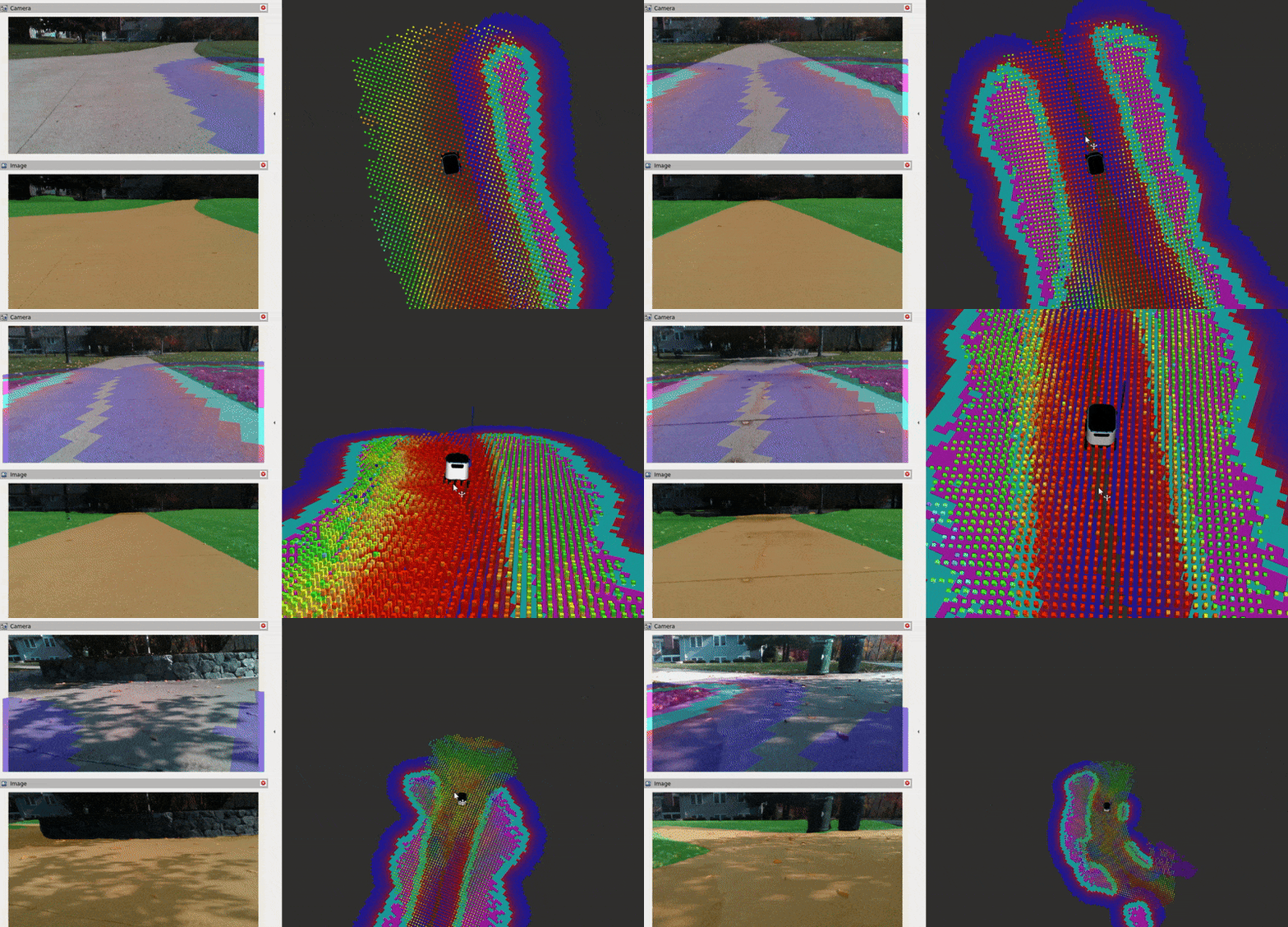
../../_images/video.gif

Requirements

It is assumed ROS2 and Nav2 dependent packages are installed or built locally. Additionally, you will need:

source /opt/ros/<ros2-distro>/setup.bash
sudo apt install ros-$ROS_DISTRO-nav2-minimal-tb4*
sudo apt install ros-$ROS_DISTRO-ros-gz-sim
sudo apt install ros-$ROS_DISTRO-ros-gz-interfaces

You will also need to compile the semantic_segmentation_layer package. To do it, clone the repo to your ROS 2 workspace source, checkout to the appropriate branch and build the package:

# on your workspace source replace rolling with your ROS distro. branches are available for humble, jazzy and rolling.
git clone -b rolling https://github.com/kiwicampus/semantic_segmentation_layer.git
cd <your workspace path>
colcon build --symlink-install # on your workspace path

The code for this tutorial is hosted in the nav2_semantic_segmentation_demo directory. It’s highly recommended that you clone and build these packages when setting up your development environment.

Finally, you will need:

  • ONNX Runtime: For running the semantic segmentation model inference

  • OpenCV: For image processing

We will install these through the tutorial.

NOTE: The semantic segmentation layer plugin is currently requires the depth and color images to be fully aligned, such as those from stereo or depth cameras. However, AI-based depth estimators may be used to create depth from monocular cameras.

Semantic Segmentation Overview

What is Semantic Segmentation?

Semantic segmentation is a computer vision task that assigns a class label to every pixel in an image. Unlike object detection, which identifies and localizes objects with bounding boxes, semantic segmentation provides pixel-level understanding of the scene.

Modern semantic segmentation is typically solved using deep learning, specifically convolutional neural networks (CNNs) or vision transformers. These models are trained on large datasets of images where each pixel has been labeled with its corresponding class. During training, the model learns to recognize patterns and features that distinguish different classes (e.g., the texture of grass vs. the smooth surface of a sidewalk). Common architectures include U-Net, DDRNet, and SegFormer.

As said above, a pre-trained model is included in this tutorial, so you can skip the training part and go directly to the integration with Nav2. However, if you want to train your own model, you can use the Simple Segmentation Toolkit to easily prototype one with SAM-based auto-labeling (no manual annotation required).
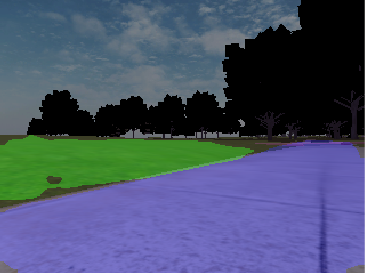
Example of semantic segmentation showing original image and segmented mask

Once trained, the output of a semantic segmentation model is typically an image with the same size as the input, where each pixel holds the probability of that pixel belonging to each class. For instance, the model provided in this tutorial has 3 classes: sidewalk, grass, and background; hence its raw output is a 3-channel tensor, where each channel corresponds to the probability of the pixel belonging to that class. Note that a model with more classes (ex: 100 classes) would output a 100-channel tensor. At the end, the class with the highest probability is selected for each pixel, and a confidence value is calculated as the probability of the class that was selected. That logic is usually performed downstream the inference itself, and in this tutorial it is performed by a ROS2 semantic segmentation node.

A perfectly working model should have a confidence value of 1 for the class that was selected, and 0 for the other classes; however, this is rarely the case. Pixels with lower confidence usually correspond to classifications that may be wrong. For that reason, both the class and the confidence are important inputs for deciding how to assign a cost to a pixel, and both are taken into account by the semantic segmentation layer. You can refer to its README for a detailed explanation on how this is done.

Tutorial Steps

0- Setup Simulation Environment

To navigate using semantic segmentation, we first need to set up a simulation environment with a robot equipped with a camera sensor. For this tutorial, we will use the Baylands outdoor world in Gazebo with a TurtleBot 4 robot. Everything is already set up in the nav2_semantic_segmentation_demo directory, so clone the repo and build it if you haven’t already:

# On your workspace source folder
git clone https://github.com/ros-navigation/navigation2_tutorials.git
cd <your workspace path>
colcon build --symlink-install --packages-up-to semantic_segmentation_sim

source install/setup.bash

Test that the simulation launches correctly:

ros2 launch semantic_segmentation_sim simulation_launch.py headless:=0

You should see Gazebo launch with the TurtleBot 4 in the Baylands world.
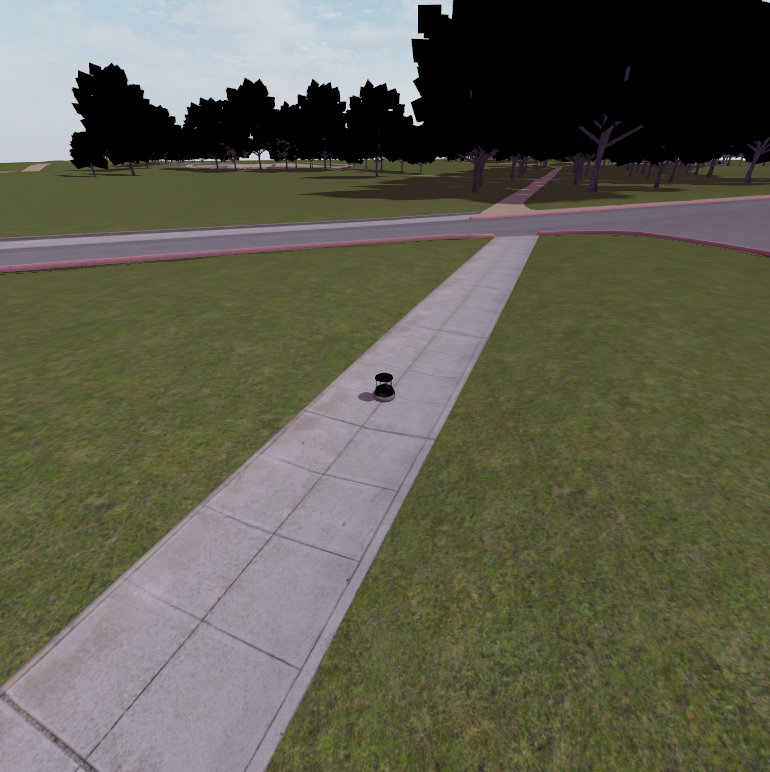
Gazebo Baylands world

1- Setup Semantic Segmentation Inference Node

The semantic segmentation node performs real-time inference on camera images using an ONNX model. It subscribes to camera images, runs inference, and publishes segmentation masks, confidence maps, and label information. To run the semantic segmentation node, you need to install the dependencies from the requirements.txt file in the semantic_segmentation_node package:

pip install -r <your workspace path>/src/navigation2_tutorials/nav2_semantic_segmentation_demo/semantic_segmentation_node/requirements.txt --break-system-packages

The segmentation node is configured through an ontology YAML file that defines:

  • Classes to detect: Each class has a name and color for visualization. Classes should be defined in the same order as the model output. 0 is always the background class.

  • Model settings: Device (CPU/CUDA), image preprocessing parameters. We use the CPU for inference for greater compatibility; however, if you have a GPU you can install onnxruntime-gpu and its dependencies according to your hardware, and set the device to cuda.

An example configuration file (config/ontology.yaml):

ontology:
  classes:
    - name: sidewalk
      color: [255, 0, 0]  # BGR format
    - name: grass
      color: [0, 255, 0]  # BGR format

model:
  device: cpu  # cuda or cpu

The node publishes several topics:

  • /segmentation/mask: Segmentation mask image (mono8, pixel values = class IDs)

  • /segmentation/confidence: Confidence map (mono8, 0-255)

  • /segmentation/label_info: Label information message with class metadata

  • /segmentation/overlay: Visual overlay showing segmentation on original image (optional)

Launch the segmentation node (with simulation running):

ros2 run semantic_segmentation_node segmentation_node

Verify that segmentation topics are being published:

ros2 topic list | grep segmentation
ros2 topic echo /segmentation/label_info --once

You should see the label information message with the classes defined in your ontology.

2- Configure Nav2 with Semantic Segmentation Layer

Now we need to configure Nav2 to use the semantic segmentation layer in its costmaps. This involves adding the layer plugin to both the global and local costmaps and configuring the cost assignment for different segmentation classes. Key parameters include:

  • Observation Sources: Defines which camera/segmentation topics to subscribe to

  • Class Types: Defines terrain categories (traversable, intermediate, danger)

  • Cost Assignment: Maps semantic classes to navigation costs

  • Temporal Parameters: Controls how long observations persist in the costmap

Currently, the costmap plugin works only with pointclouds from a stereo camera, which are aligned to the color image and thus with the segmentation mask.

Here’s an example configuration for the local costmap:

local_costmap:
  local_costmap:
    ros__parameters:
      plugins: ["semantic_segmentation_layer", "inflation_layer"]
      semantic_segmentation_layer:
        plugin: "semantic_segmentation_layer::SemanticSegmentationLayer"
        enabled: True
        observation_sources: camera
        camera:
          segmentation_topic: "/segmentation/mask"
          confidence_topic: "/segmentation/confidence"
          labels_topic: "/segmentation/label_info"
          pointcloud_topic: "/rgbd_camera/depth/points"
          max_obstacle_distance: 5.0
          min_obstacle_distance: 0.3
          tile_map_decay_time: 2.0
          class_types: ["traversable", "intermediate", "danger"]
          traversable:
            classes: ["sidewalk"]
            base_cost: 0
            max_cost: 0
          intermediate:
            classes: ["background"]
            base_cost: 127
            max_cost: 127
          danger:
            classes: ["grass"]
            base_cost: 254
            max_cost: 254

The tutorial provides a pre-configured nav2_params.yaml file in the semantic_segmentation_sim package. You can use it to configure the Nav2 costmaps for your own application.

3- Run everything together

The tutorial provides a complete launch file that launches the simulation, the semantic segmentation node, and the Nav2 navigation stack. To run it, simply launch the segmentation_simulation_launch.py file:

ros2 launch semantic_segmentation_sim segmentation_simulation_launch.py

The Baylands simulation and rviz should appear. You should be able to send navigation goals via rviz and the robot should navigate the Baylands world, preferring sidewalks and avoiding grass:
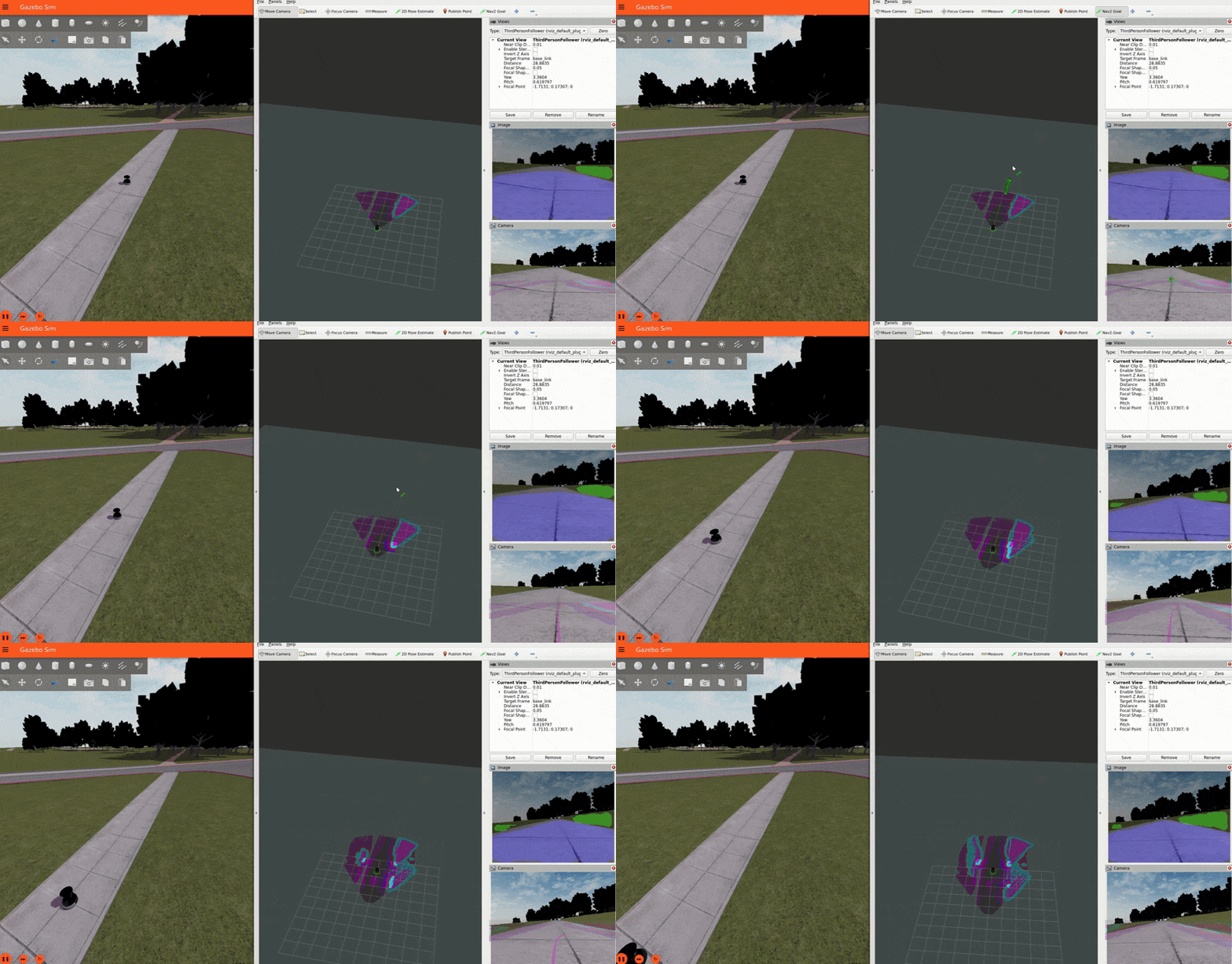
../../_images/demo.gif

To better see what the plugin is doing, you can enable the segmentation tile map visualization in rviz. This will show a pointcloud of the segmentation observations for each tile, colored by their confidence. Again, you can refer to the picture on the Layer’s README for a visual explanation of how observations are accumulated on the costmap tiles and how that translates to the cost assigned to each tile.
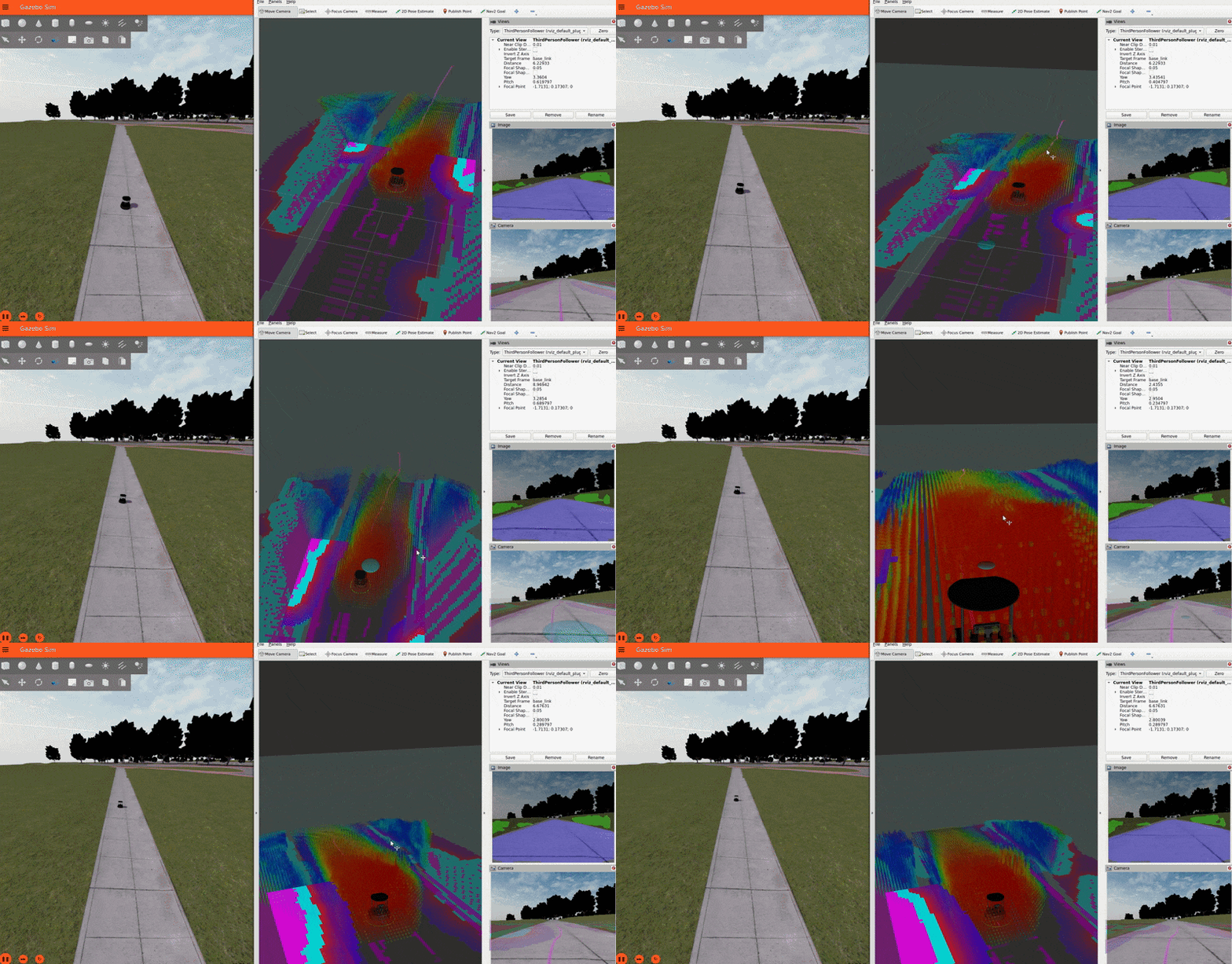
../../_images/tile_map.gif

IMPORTANT NOTE: For the sake of simplicity, this tutorial publishes a static transform between the map and odom frames. In a real-world application, you should have a proper localization system (e.g. GPS) to get the map => odom transform.

Conclusion

This tutorial demonstrated how to integrate semantic segmentation with Nav2 for terrain-aware navigation using a pre-trained model that works on Gazebo’s Baylands world and a custom semantic segmentation layer plugin.

To go further, you can train your own model using the Simple Segmentation Toolkit, and tune the costmap parameters to your own application.

Happy terrain-aware navigating!


© Copyright 2026, Open Navigation LLC.